
PrinterShare
2.3.08
Size: 4.08 MB
Downloads: 18595
Platform: Windows (All Versions)

You don’t have a printer, but your friend Bob has one. With PrinterShare, Bob can share his printer and you can print out documents on it. You can remotely print out documents on someone else’s printer.
You have a printer, but your friend Bob doesn’t. With PrinterShare, you can share your printer and Bob can print out documents on it. Someone else can remotely print out documents on your printer.
PrinterShare is available for multiple platforms: Windows, Mac, iOS, Android, and the web (print documents directly from the web).
The system requirements for running PrinterShare on a Windows PC are: at least 128MB of RAM (256MB or more recommended), 10MB of free disk space, internet connection (broadband recommended), any Windows edition from Windows XP up to Windows 8.
A setup wizard will help you install PrinterShare on a Windows PC that meets the system requirements presented above. By default, the setup wizard will install the following components: PrinterShare program files (PrinterShare console files, shortcuts, and Registry entries), virtual printer (documents printed on it are sent to other PrinterShare clients), Bonjour/Nearby service (mobile phones on the same WiFi network will automatically detect this client).
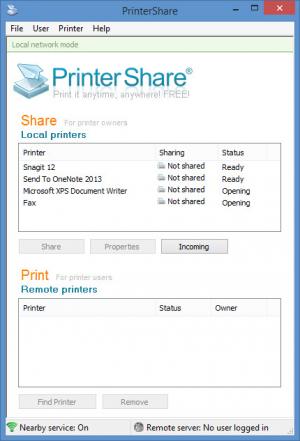
The main panel of PrinterShare’s interface features two sections:
Share – a list of printers that you can share with others. Use this section to select the printer(s) you want to share with other people.
Print – a list of printers shared by others. Use this section to select the remote printers you want to use to print documents.
PrinterShare works in local network mode and internet mode. While in local network mode, shared printers are visible to devices/users connected to the same network. While in internet mode, shared printers are visible to devices/users across the internet. To use internet mode you will have to create a PrinterShare account.
Print out documents on someone else’s printer and let others remotely print out documents on your printer. This sort of wonderful functionality is offered by PrinterShare.
Pros
PrinterShare is available for multiple platforms; Windows, Mac, iOS, Android, and the web (print documents directly from the web). Share your printers with others; access printers shared by others. PrinterShare works in local network mode and internet mode.

Cons
Printing limitations for the free version.

PrinterShare
2.3.08
Download
PrinterShare Awards

PrinterShare Editor’s Review Rating
PrinterShare has been reviewed by George Norman on 22 Sep 2014. Based on the user interface, features and complexity, Findmysoft has rated PrinterShare 4 out of 5 stars, naming it Excellent







